





































India Post GDS 4th Merit List: Indian Post GDS Fourth Merit List Released, Here’s How to Download the PDF File
India Post GDS 4th Merit List: Those students who had applied for the Gramin Dak Sevak recruitment and whose names did not appear in the initial three lists released, the fourth merit list has now been released for them.

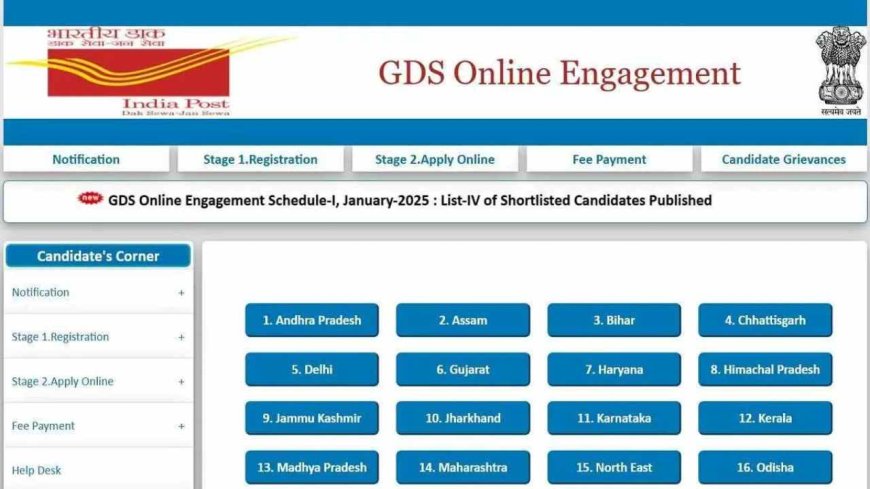
India Post GDS 4th Merit List: Those students who had applied for the Gramin Dak Sevak recruitment and whose names did not appear in the initial three lists released, the fourth merit list has now been released for them. All those candidates who were worried about not having their names in the first, second, and third merit lists, this fourth merit list is a golden opportunity for them. You can download the list for your state through the official website.
How to Download India Post GDS 4th Merit List
To download the fourth merit list of India Post Gramin Dak Sevak, the step-by-step process is explained below, follow it carefully.
- First, you need to open your browser and visit the indiapostgdsonline.gov.in website.
- Here, you will see the option for Candidates’ Corner, click on it.
- After that, the list of all states will open in front of you, where you need to click on the name of your state.
- Then, the option for Supplementary List – IV (4th List) will appear, click on it.
- After that, the PDF file will be downloaded, which you need to open.
- After opening, press Ctrl+F on your computer keyboard and type your name to search.
- Take a printout of the page where your result is displayed.
What to Do After Your Name Appears in the Merit List
If your name has appeared in this merit list, you need to prepare all your documents for document verification. India Post will contact you for this, and the date for your document verification will be informed through your mobile number or email ID. If any of your documents are incomplete, you need to complete them within this time.